Customs documents and shipping documents
Please note that the USA and Puerto Rico have specific customs regulations. Read more here.
When purchasing online or in the PostNord App
With Buy postage, you can easily purchase shipping online and complete the customs declaration directly. Your service point can print the shipping labels, including customs documentation, when you present the QR code. Alternatively, you may print the documentation yourself and drop off your shipment at any service point.
When purchasing at a service point
You can also purchase shipping and create customs documentation at a service point. Purchasing via a service point results in a higher shipping price and a longer delivery time compared with purchases made digitally.
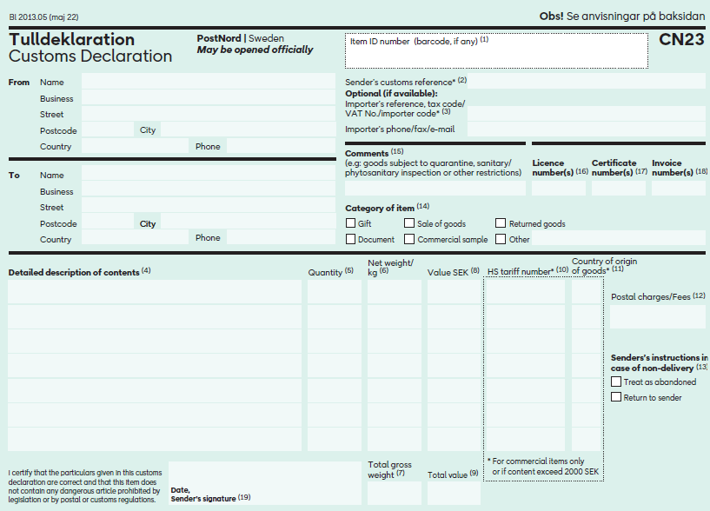
Different Customs declarations depending on the service
CN22 is a simplified customs declaration used for letter items containing goods. When purchasing shipping digitally, the system automatically chooses the correct type of customs document for you.
If you are sending an International 1:st class Letter and prefer to use a physical customs declaration, you can collect the form at one of our service locations or order it here on the website. You then purchase the postage at a service point, or frank your item with stamps, and receive assistance in attaching the customs declaration to the shipment.
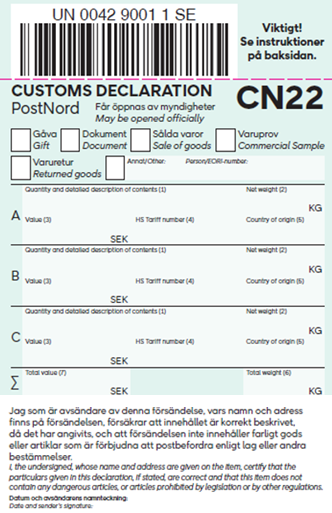
Instructions
- All information must be written in English or French, and it must be clear and legible.
- Tick/indicate the reason for export.
- Specify the quantity and provide a clear description of the contents, for example: “two men’s cotton shirts.” Avoid generic descriptions such as “Accessories” or “Merchandise.” Clear descriptions simplify customs processing in the destination country and reduce the risk of the shipment being returned.
- State the weight of the item in kilograms, e.g., “0.45 kg.”
- State the value of the item in SEK, e.g., “412 kronor.”
- If the item is exported for commercial purposes, you must provide the customs tariff code (first 8 digits) and a personal/EORI number. Otherwise, this field may be left blank. Read more about customs tariff codes.
- State the country of manufacture using the ISO code, e.g., “SE.”
- State the total weight of the shipment in kilograms. State the total value of all items combined, in Swedish kronor. The form can be ordered here on the website or collected from any of our service points.